Free Epson printer driver

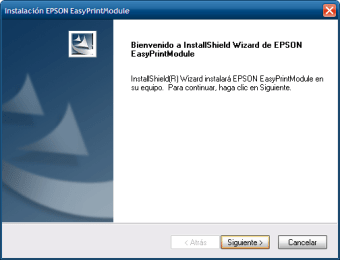
Epson EasyPrint is a free driver utility designed to help computers communicate with older Epson printers. It provides all the necessary files and sends print jobs to the connected printer. It’s an alternative if someone lost their original installation CD. It simplifies the setup process with a straightforward installation wizard.

Use your old printer for longer

Epson EasyPrint’s simple and guided setup wizard makes the installation process easy, even for users who are not very tech-savvy. Since the software is a compact file, it is quick to download and install, getting an old model printer back to working order without much hassle or a lengthy process.

However, it causes significant compatibility issues with modern OS like Windows 11. It often requires users to enable backward compatibility, which doesn’t always work. It may also fail to install or function correctly, leaving users without a printing solution. Its limited functionality also means it only works as a basic driver.

A quick and easy way to revive your printer

Overall, Epson EasyPrint is a simple and free solution for a specific problem—connecting an older printer to a computer. While it provides a good starting point for users who have lost their original drivers, its outdated nature and potential for compatibility problems on newer systems can be a source of frustration.


  • Pros

    • Great if you lost the original installation files
    • Easy setup wizard
  • Cons

    • Requires backward compatibility
    • Installation issues
 0/1

App specs

  • License

    Free

  • Version

    3.10a

  • Latest update

  • Platform

    Windows

  • OS

    Windows Vista

  • Language

    English

  • Downloads

    169K

    Last month's downloads

    • 1.5K
  • Size

    1.98 MB

  • Developer

Program available in other languages


User reviews about Epson EasyPrint

3.3

1 reviews

Add review

Main reviews for you

  • Anonymous user

    I need to print to printer source 1 which has photo paper. The printer is set up that way. But when I print from Easy Photo Print using EasyPrint, it always select source 2 and prints it on plan letter size paper.In other words it is useless. Odd for years I used Easy Photo Print successfully. It was great. What is the problem? Windows 10. EasyPrint using the wrong driver? Very, very unhappy.

More

You may also like

Alternatives to Epson EasyPrint

Explore Apps

Latest articles

Laws concerning the use of this software vary from country to country. We do not encourage or condone the use of this program if it is in violation of these laws.
Softonic

Is Epson EasyPrint safe?

Score result: Clean

This file passed a comprehensive security scan using VirusTotal technology. It is safe to download.

  • Virus free
  • Spyware free
  • Malware free
  • Verified by Security Partners

    VirusTotal logo

Scan Info

Last scan
Wednesday, December 2, 2020
Scan provider
VirusTotal

Softonic security commitment

Epson EasyPrint has been thoroughly scanned by our advanced security systems and verified by industry-leading partners. This file comes from the official developer and has passed all our security checks, showing no signs of viruses, malware, or spyware. For more information, visit our Security and Trust Center